Teardown No. 05 · Marker.io · pricing page
Ten changes to Marker.io’s pricing page
Where the page and its help centre disagree.
Captured Not affiliated with Marker.io
Changes01: Make the page and the help centre agree on scans03: Say which plan the trial is, at the buttons05: Put the price of one more member on the card
Marker.io is a website feedback and monitoring tool from Marker.io SRL, Brussels. Its pricing page sells three plans by the month, an Agency plan, extra members and a page
Much of it works. Each card is short: a price, who it is for, seven lines. One switch moves the prices between Annual and Monthly everywhere at once: the cards, the table, the
Want one for your page? A Teardown: US$950, 5 working days
Ten changes, in order
Change 1: Make the page and the help centre agree on scans
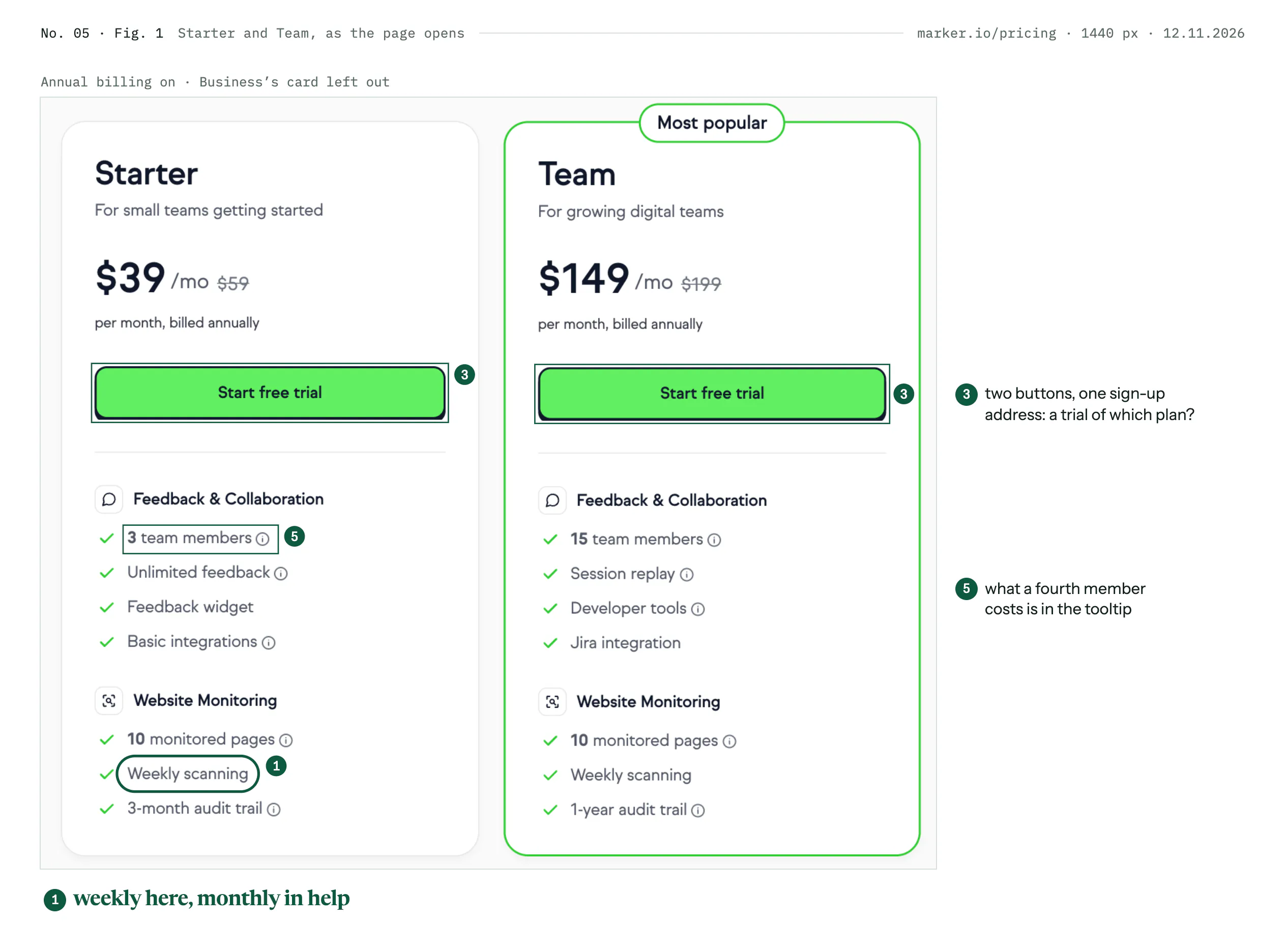
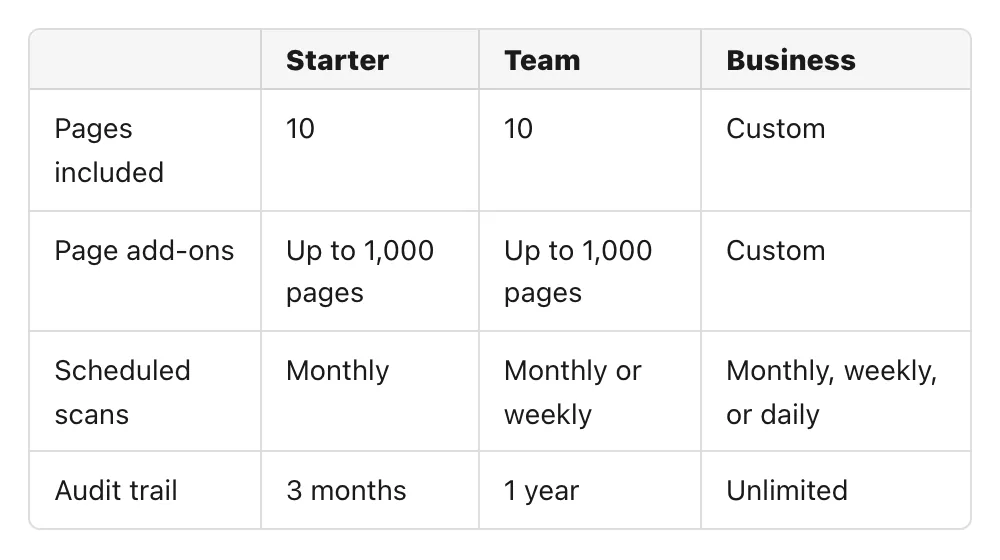
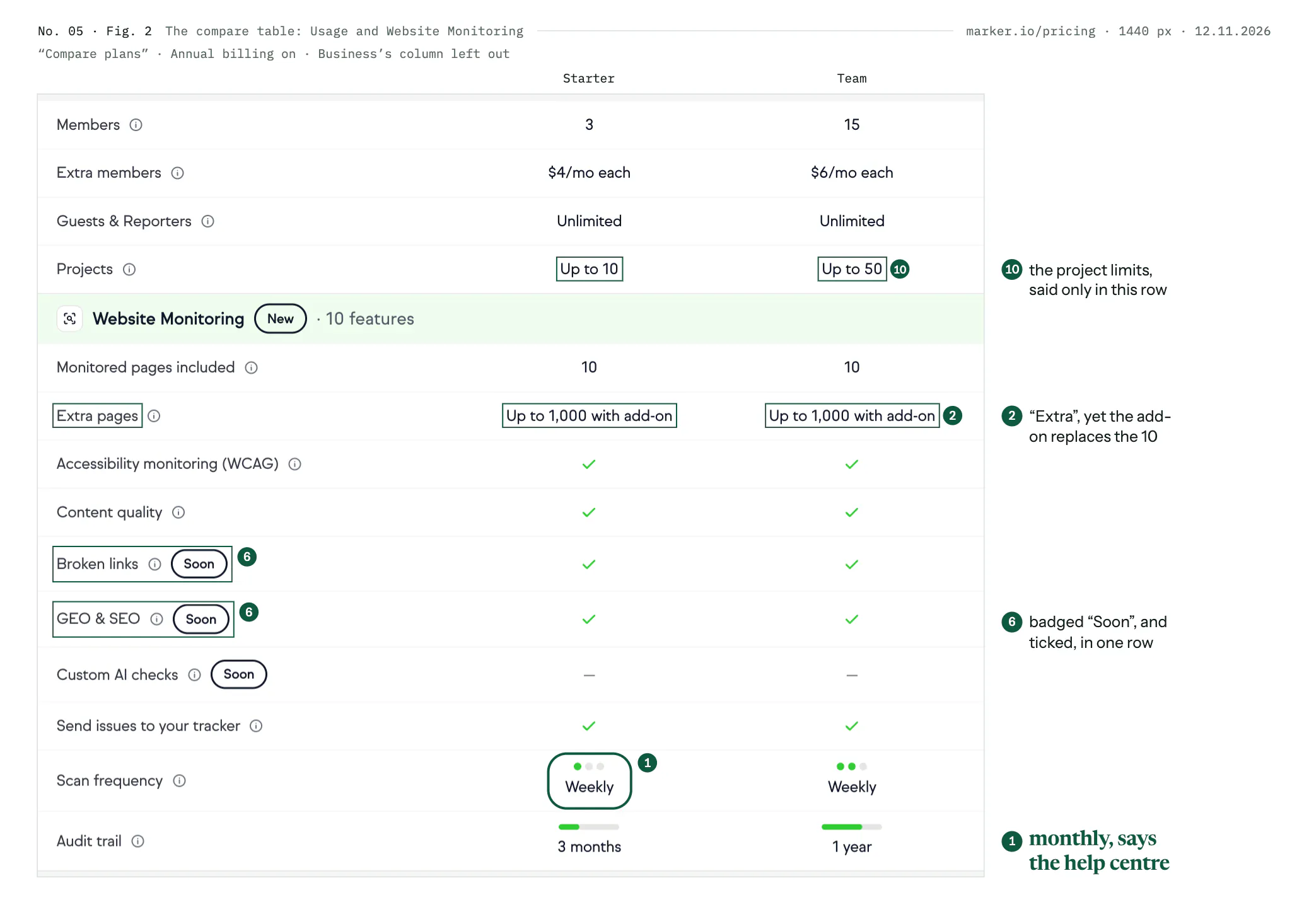
Seen. Starter’s card and Team’s card both say “Weekly scanning” (Fig. 1). The compare table’s “Scan frequency” row reads Weekly, Weekly, Daily (Fig. 2). Marker.io’s help article “Plans and pricing”, read the same morning, has a table, “What each plan includes”. Its “Scheduled scans” row reads Monthly for Starter, “Monthly or weekly” for Team and “Monthly, weekly, or daily” for Business (the inset). The Agency plan splits the same way: “Weekly scanning” on its card, “Monthly scheduled scans” in its help article (read on 12 November 2026, not shown here).
Why it matters. How often a page is scanned is one of the three things that set the monitoring tiers apart. A team that picks Starter for a weekly scan, then opens the help centre to set it up, finds a different promise. From outside I can’t tell which one is current.
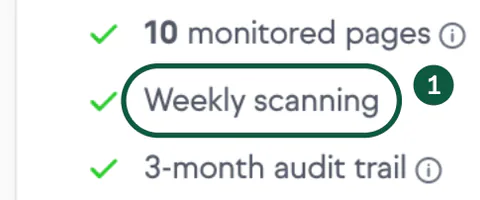 Seen in Fig. 1weekly here, monthly in help
Try. Settle which is true today, and make both say it. If Starter scans weekly, correct the help table. If it scans monthly, the card and the row should say “Monthly scanning”, and weekly scans become a reason to choose Team.
 , open it full size
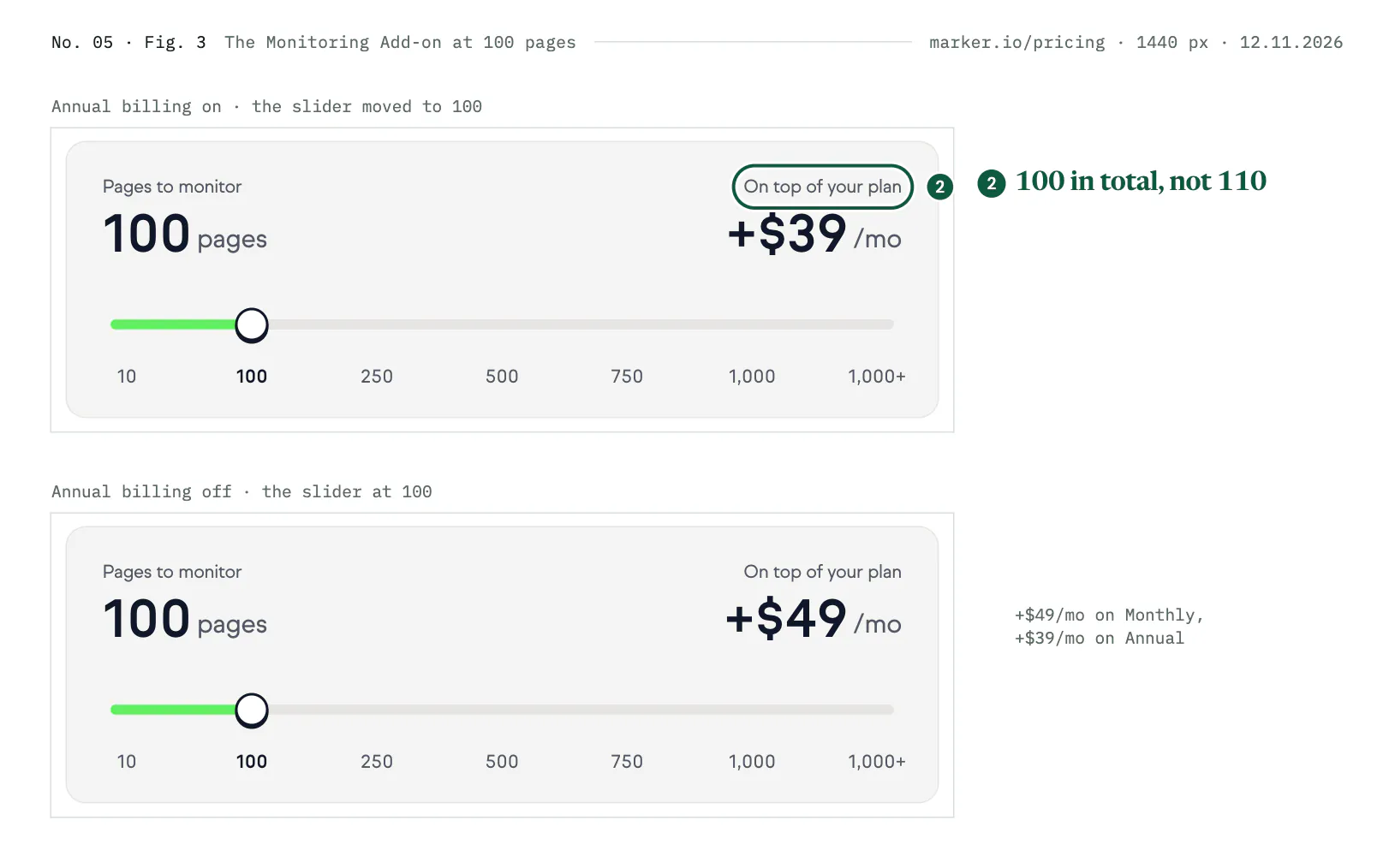
Change 2: Say that the add-on ’s pages are a total
Seen. Move the Monitoring
Why it matters. “On top of your plan” is true of the price, and reads as true of the pages. A team with 105 pages to watch would buy the 100 size and expect it to be enough.
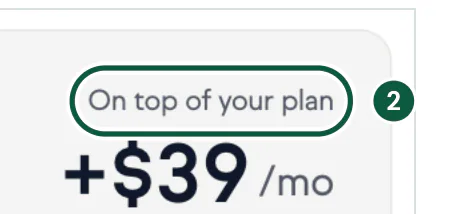 Seen in Fig. 3100 in total, not 110
Try. Under the number, the help article’s own words: “100 pages in total. Replaces the 10 included.” And name the table’s row for what it is, “Page
 , open it full size
Change 3: Say which plan the trial is, at the buttons
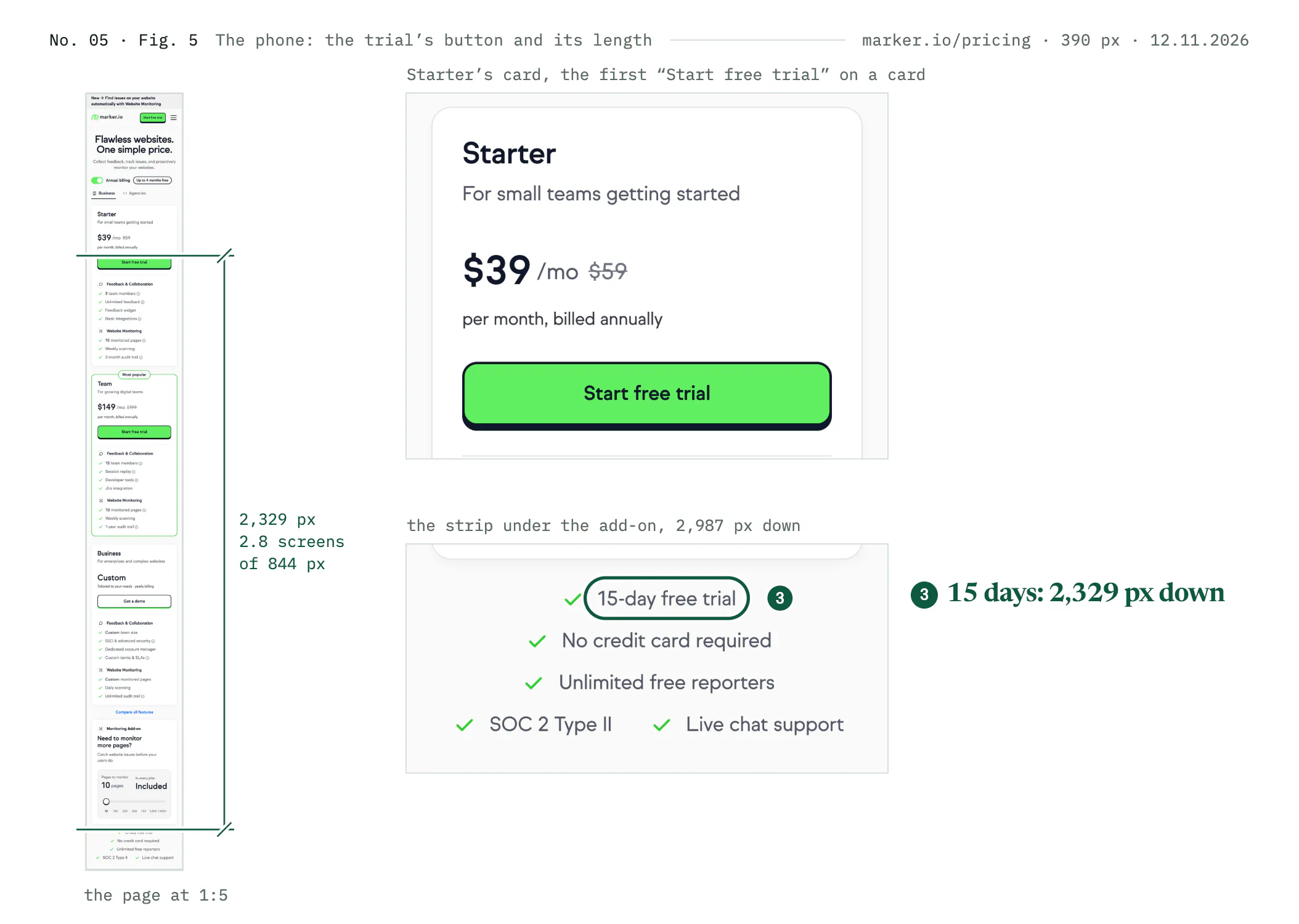
Seen. Starter and Team each carry a button, “Start free trial” (Fig. 1). Both point to the same address, app.marker.io/account/register, with nothing in it that names a plan (read, not followed). The trial’s only line on the page is in a strip under the
Why it matters. Someone who presses Starter’s button expects to try Starter. By the help article they get Team, with session replay and the Jira integration that Starter doesn’t list, and a limit of 25 issues. All three are worth knowing before the first client is invited. I did not sign up, so I can’t say what the
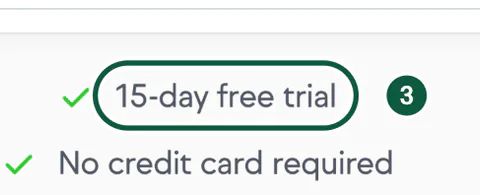 Seen in Fig. 515 days: 2,329 px down
Try. One line under both buttons: “15 days of Team, free. Up to 25 issues. No card.” Then Starter’s button can say what it starts: “Try free, then choose Starter”.
 , open it full size
Change 4: Let the headline say what is simple
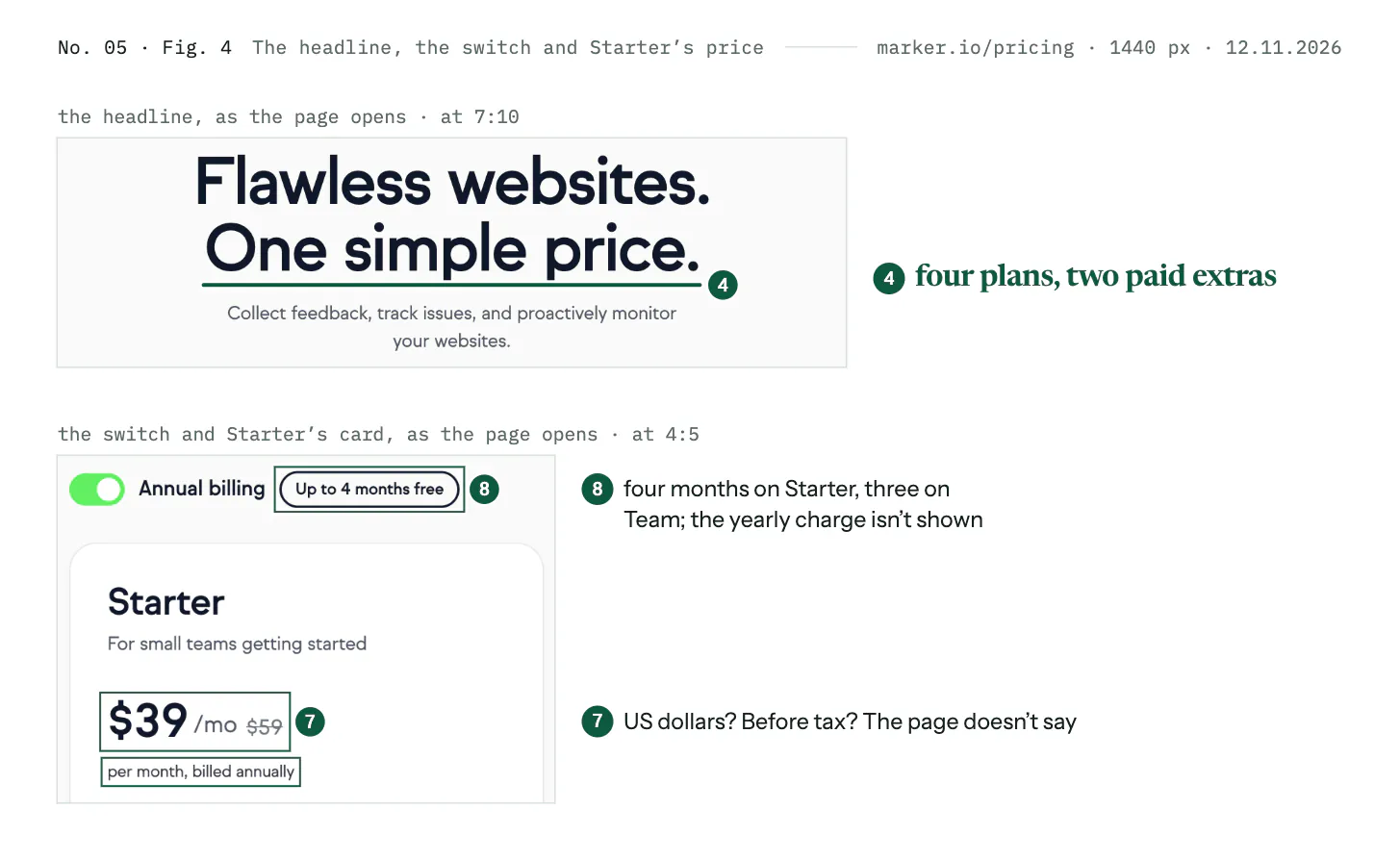
Seen. The headline reads “Flawless websites. One simple price.” (Fig. 4). Under it are Starter, Team and Business; an Agency plan behind a tab; extra members at $4 or $6 a month each; and a page
Why it matters. A reader takes “one simple price” at its word, then meets four plans and two paid extras. The page has something simple it can truly claim: guests and reporters are free and unlimited on all three plans, so a client never needs a seat.
 Seen in Fig. 4four plans, two paid extras
Try. Keep the first line and let the second say that: “Flawless websites. Your clients never need a seat.” Or keep both lines and put the claim under them: “From $39 a month. Guests and reporters are free on every plan.”
Change 5: Put the price of one more member on the card
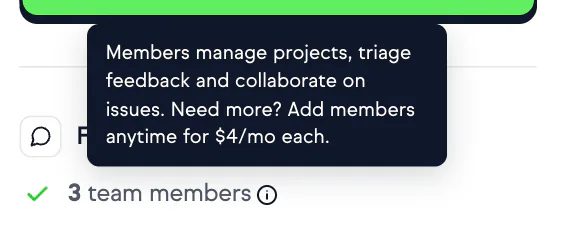
Seen. Starter’s card says “3 team members”, Team’s “15 team members” (Fig. 1). What a fourth member costs is in the tooltip on that line: “Need more? Add members anytime for $4/mo each.” (the inset). It is also in the FAQ, whose answer says “No need to upgrade.”, and in the table’s “Extra members” row, 3,008 px below the first price (Fig. 2).
Why it matters. “3 team members” reads as a limit. A team of five sees 3 against 15 and $39 against $149. With the tooltip’s price, five members on Starter come to $47 a month ($39 + 2 × $4; the sum is mine). The page’s own FAQ wants buyers to know this. The card is where they decide.
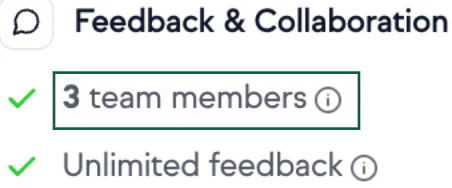 Seen in Fig. 1what a fourth member costs is in the tooltip
Try. On the card’s line: “3 team members included, then $4/mo each”. The same on Team, at $6.
 , open it full size
Change 6: Don’t tick what the table calls “Soon”
Seen. In the compare table, “Broken links” and “GEO & SEO” each carry a “Soon” badge, and a tick under all three plans (Fig. 2). The FAQ says: “Every scan checks your pages for accessibility issues against WCAG A, AA or AAA, content quality problems like typos and missing images, and broken links. GEO & SEO checks are coming soon” (the inset). So broken links are checked today by the FAQ and “Soon” by the table, and GEO & SEO are coming soon by the FAQ and ticked by the table.
Why it matters. A tick means “you get this today”. If broken links are live, the badge undersells them. If GEO & SEO are not, the tick promises a check the FAQ says is still to come.
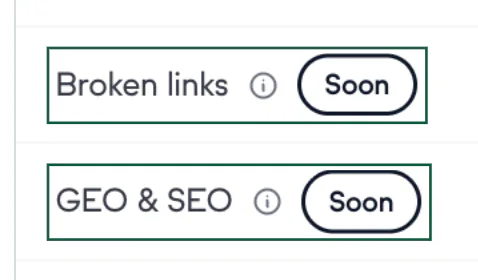 Seen in Fig. 2badged “Soon”, and ticked, in one row
Try. Take “Soon” off “Broken links” if it has shipped. On “GEO & SEO”, put “Soon” in the three cells in place of the ticks.
 , open it full size
Change 7: Say the currency and the tax, once
Seen. Each price carries a $ sign (Fig. 4). The page’s text at 1440 px never says “USD”, “VAT” or “tax”: I searched it. The help centre does: “All prices are in USD” in “Plans and pricing” (read on 12 November 2026, not shown here), and “Prices don’t include taxes. Taxes are calculated at checkout based on your location.” in “How billing works” (the inset). Marker.io SRL is in Brussels.
Why it matters. A buyer in Europe has to guess whether VAT comes on top. A buyer in Canada or Singapore has to guess which dollar. Both learn the answer at checkout, when the number has already gone into a purchase request.
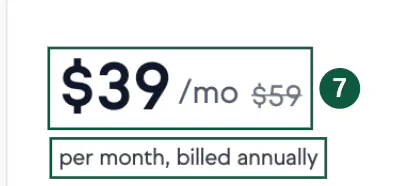 Seen in Fig. 4US dollars? Before tax? The page doesn’t say
Try. One line under the cards: “Prices in US dollars, before tax. Tax is added at checkout, by country.”
 , open it full size
Change 8: Show what Annual charges, and what it saves on each price
Seen. With Annual on, Starter reads “$39 /mo”, a struck-through “$59” and “per month, billed annually”, beside a badge, “Up to 4 months free” (Fig. 4). The amount charged is not on the page. The help article gives it: “Starter on yearly billing costs $468 a year.” (the inset). The saving differs from price to price. Starter saves $240 a year, just over four months of $59. Team saves $600, about three months of $199. The
Why it matters. On Annual the first charge is $468 or $1,788, not $39 or $149. That is the number a buyer needs for a purchase request. And among the plans and the
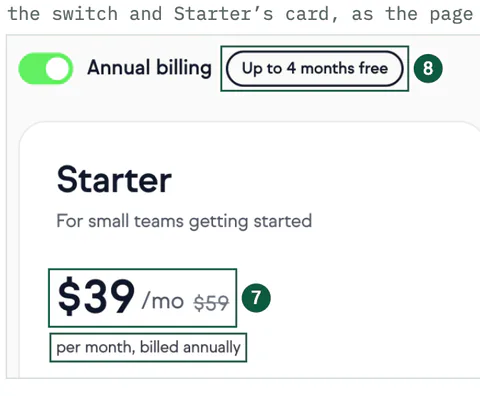 Seen in Fig. 4four months on Starter, three on Team; the yearly charge isn’t shown
Try. On each card: “$39 a month, billed as $468 a year”. Beside each Annual price, its own saving: “Save $240 a year”.
 , open it full size
Change 9: Put the Agency plan’s two conditions on its card
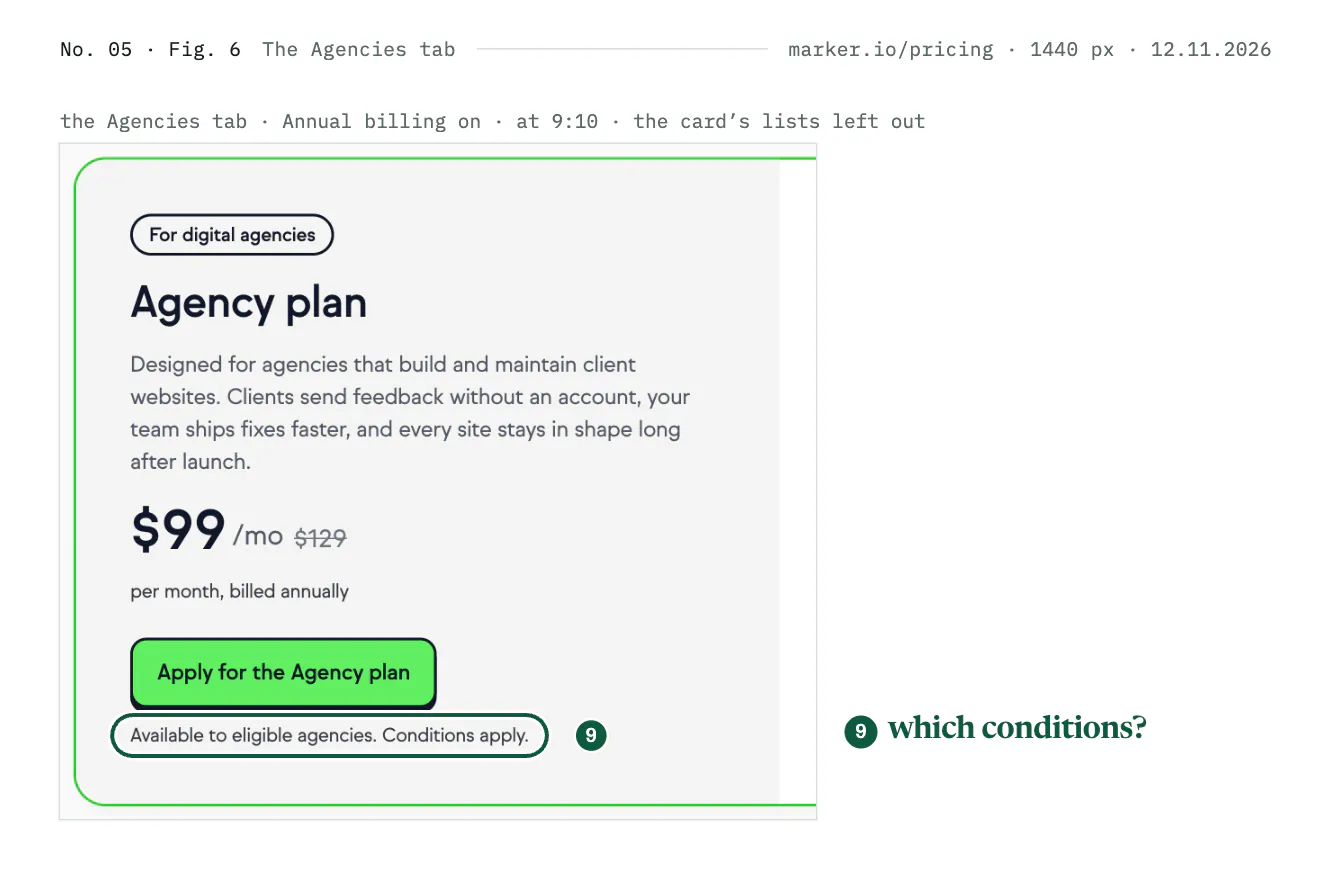
Seen. Behind the Agencies tab, the Agency plan shows $99 /mo, a struck-through $129, a button, “Apply for the Agency plan”, and one line: “Available to eligible agencies. Conditions apply.” (Fig. 6). The button points to a help article (read, not followed from the page). The article lists the conditions: “Have fewer than 50 employees” and “Be a service-based business working with clients” (the inset).
Why it matters. The card lists Team’s 15 members, session replay, developer tools and Jira integration at $50 a month less than Team. An agency owner wants to know in one glance whether that price is theirs. Two short conditions fit on the card.
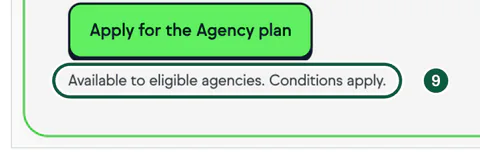 Seen in Fig. 6which conditions?
Try. In place of “Conditions apply”: “For agencies with fewer than 50 employees that work for clients.”
 , open it full size
Change 10: Bring the project limits up to the cards
Seen. Starter allows “Up to 10” projects and Team “Up to 50” (Fig. 2). As the page opens, that row is the only place the word “project” appears: it sits 3,110 px below the first price, after the FAQ. Neither card mentions projects. Three of the table’s five groups also open closed: Feedback & Collaboration, Integrations, and Security & Support, 29 of its 43 rows. Opened with “Expand all features” (read on 12 November 2026, not shown here), they hold seven rows where Team has a tick and Starter a dash, session replay and Jira among them.
Why it matters. A team that looks after many sites is sorted by the project limit before any feature. And the closed groups hold most of what separates Starter from Team.
 Seen in Fig. 2the project limits, said only in this row
Try. Add “Up to 10 projects” and “Up to 50 projects” to the cards’ first lists. Open Feedback & Collaboration as the page loads.
six figures · 1440 and 390 px · captured 12.11.2026
The page, shown on screenshots
Each change is framed and carries its number from the list above; the one that matters most in each figure is ringed or underlined in green. Green figures in mono were measured on the page. Fig. 3 and Fig. 6 show states reached with the page’s own controls: the
 , open it full size
Changes01: Make the page and the help centre agree on scans02: Say that the
 , open it full size
 , open it full size
Changes04: Let the headline say what is simple07: Say the currency and the tax, once08: Show what Annual charges, and what it saves on each price
 , open it full size
 , open it full size
Tests · Suggested, not run
What I’d test first
1The trial, named at the buttons (change 3). Show half of new visitors today’s cards, and half the same cards with the line “15 days of Team, free. Up to 25 issues. No card.” under both buttons. Measure trials started and, once they have ended, paid plans by plan. Watch Starter purchases as the guardrail. Agree beforehand the smallest change worth acting on, and run for at least two full weeks.
2The yearly charge on the cards (change 8). Show half of new visitors “$39 a month, billed as $468 a year”. Measure the share of new paid plans that choose Annual. Watch paid plans started as the guardrail. Changes 1, 2, 6, 7 and 9 need no test: they make the page agree with itself and with the help centre.
The record12.11.2026
- No.
- 05
- Subject
- Marker.io
- Page or flow
- pricing page, marker.io/pricing
- Region
- EU
- Captured
- , at 1440 and 390 px
- Published
- Inside
- ten changes, in order · six figures · eight insets
Public pages only, as seen on the date. Not affiliated with Marker.io.
Free: the pricing-page checklist, with examples from the teardowns, and the pricing page self-check to print.
How it was read · Public pages only
Method and limits
- Public page only. No inside data, not affiliated.
- What I looked at. The public page marker.io/pricing, as a visitor who was not signed in, on Thursday 12 November 2026 between 07:00 and 07:54 UTC, from India. Prices were shown in US dollars. The same morning I read three help articles: “Plans and pricing”, “How billing works”, which the FAQ links to, and “Agency Plan”, which the Agency plan’s button points to.
- How. Screenshots in headless Google Chrome at 1440 px and 390 px wide; the help articles at 1100 px. A short script used the page’s own controls, as a visitor would: the Annual billing switch, the
add-on ’s slider, the Agencies tab, two tooltips, three FAQ answers and “Expand all features”. The buttons’ addresses were read, not followed. - Measured. Every position and distance from the page’s layout, in CSS pixels. The sums ($39 × 12, $20 × 12 / $59, 2,329 / 844 and the like) are mine.
- What I did not do. No account, no trial, no form and no contact with Marker.io. A cookie note appears on a first visit. No choice was made in it, and it is out of every figure.
- What I don’t know. Marker.io’s traffic, conversion rates, test history or plans. Whether the page or the help centre is right about scans. What the
sign-up pages say about the trial. Some of these changes may already have been tried. - Limits. The page may differ by country, by visitor and over time. A banner at its top read “New → Find issues on your website automatically with Website Monitoring”, so this part of the page is new and may be changing. The help articles said “Updated over a week ago” and “Updated over 3 weeks ago”. The figures show the page as captured on the date above, not as it is today.
- Corrections. Spot an error? Write to hello@quietlybuild.in. A correction is dated on this page, under Revisions, and the change it touches links to it.
- Not affiliated. I have no connection with Marker.io, and Marker.io has not reviewed this. The Marker.io name belongs to Marker.io SRL.
Sources
- Marker.io, “Pricing & Plans for All Teams”, marker.io/pricing, read on 12 November 2026, with its cards, the Agencies tab, the Monitoring
Add-on ’s slider, its FAQ answers on members and on Website Monitoring, and its compare table. - Marker.io Help Center, “Plans and pricing”, help.marker.io, read on 12 November 2026: scheduled scans by plan, what a page
add-on gives, the yearly charge, the currency and the free trial. - Marker.io Help Center, “How billing works”, help.marker.io, read on 12 November 2026: prices don’t include taxes.
- Marker.io Help Center, “Agency Plan”, help.marker.io, read on 12 November 2026: who is eligible, and its monthly scheduled scans.
- Marker.io, “Privacy Policy”, marker.io/privacy, read on 12 November 2026: Marker.io SRL, Brussels, Belgium.